

By:
Haris RanaLast Updated:
TL;DR
- You can add a video redaction API to your SaaS without training your own models.
- Redactor ships trained detection with three integration patterns: REST API, self-hosted worker, and embedded editor.
- The choice is about cost, latency, and data sovereignty, not model accuracy.
- Self-hosting keeps sensitive media inside your environment.
- An AI-agent toolkit gets a first integration running fast.
Sensitive footage — heads, license plates, screens, and on-screen documents — often has to be redacted before it leaves a SaaS platform, yet most product teams have no computer-vision group to build that. This guide shows SaaS product managers, platform engineers, and ISV partners how to add video redaction by integrating an existing engine, and how to choose among three patterns by cost, latency, and data sovereignty.
Do you need to train your own models to add redaction?
No. For most product teams, training detection models is the wrong place to spend engineering time.
A useful model needs labeled footage across lighting, angles, and resolutions, plus an evaluation harness and retraining as data drifts. That is a multi-quarter research program before a single customer file is processed.
The build path makes sense in narrow cases: detection classes no vendor offers, an in-house computer-vision team, or redaction as the core product itself. Most teams are better off buying detection and spending their effort on the integration, the review workflow, and the customer experience.
The same trade-off shows up when teams weigh manual versus automated redaction: the hard part is doing it reliably at volume, not drawing a single box. A shipped detector paired with a human review step is also more defensible than a half-trained model maintained alone, whether the footage carries PII in images and video or evidence headed for legal disclosure.
What are the three ways to embed a video redaction API in a SaaS product?
Three integration patterns cover almost every case: call the REST API, run a self-hosted worker, or embed the editor. The cleanest mental model is one redaction engine reached in different ways, depending on whether a person reviews the output.
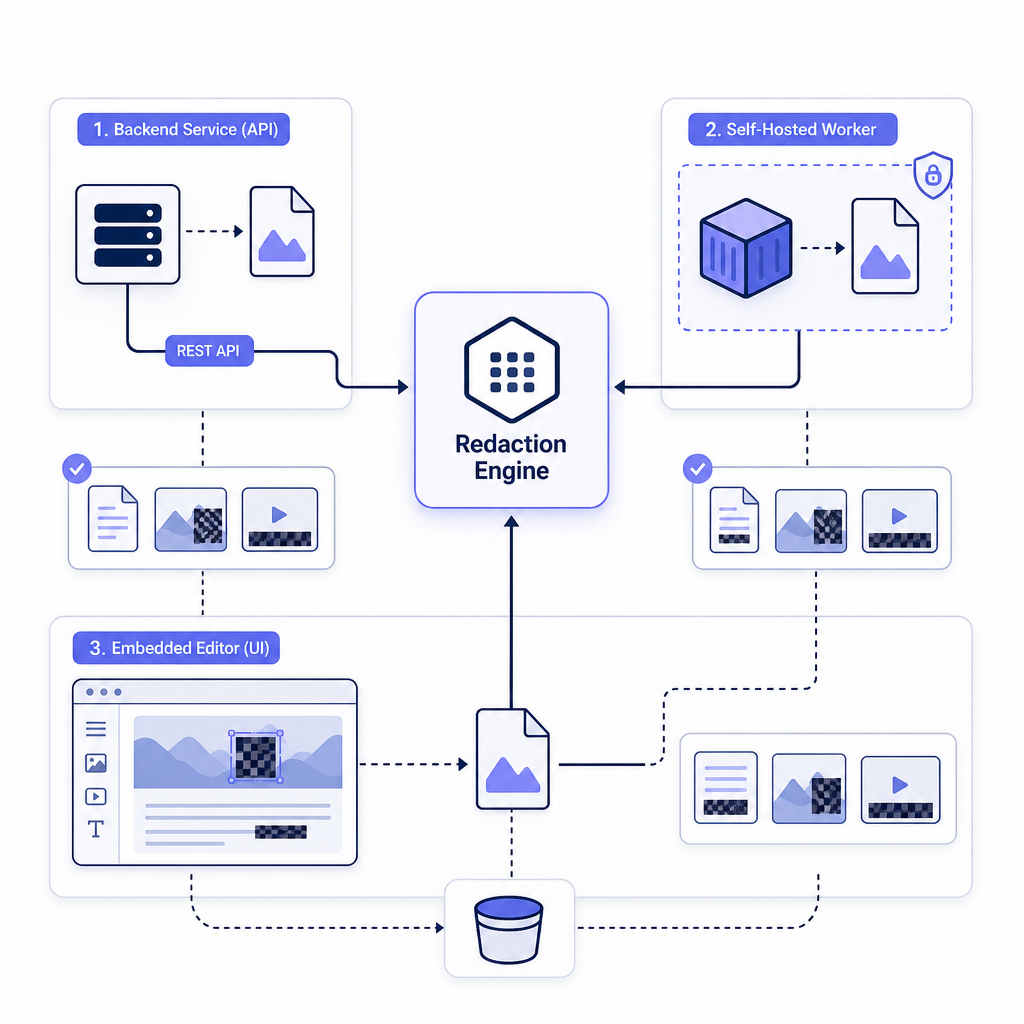
In the reference architecture, an application hands a file to the engine, the engine detects and redacts, and a redacted copy lands in storage the team controls. Where the engine runs and who reviews the result is what separates the patterns.
Teams weighing where the software itself lives can compare the deployment models side by side, and the API basics walkthrough shows the first calls end to end.
Pattern 1: Call the redaction REST API
This pattern fits when redaction is a background job and no person needs to touch each file. A service sends a request describing the input, the detection features, and the output location, and the engine signals completion.
The call is a POST to a videos:process endpoint with an input URI, a list of detection features, and an optional output URI. It is asynchronous: it returns an operation name to poll, or a completion webhook fires when a file is ready.
Input and output can point at HTTP, a local path, AWS S3, or Azure Blob Storage, so files move through infrastructure the team already runs. The videos:process API reference documents every field, and the fully automated AWS S3 example wires a storage event to an automatic job.
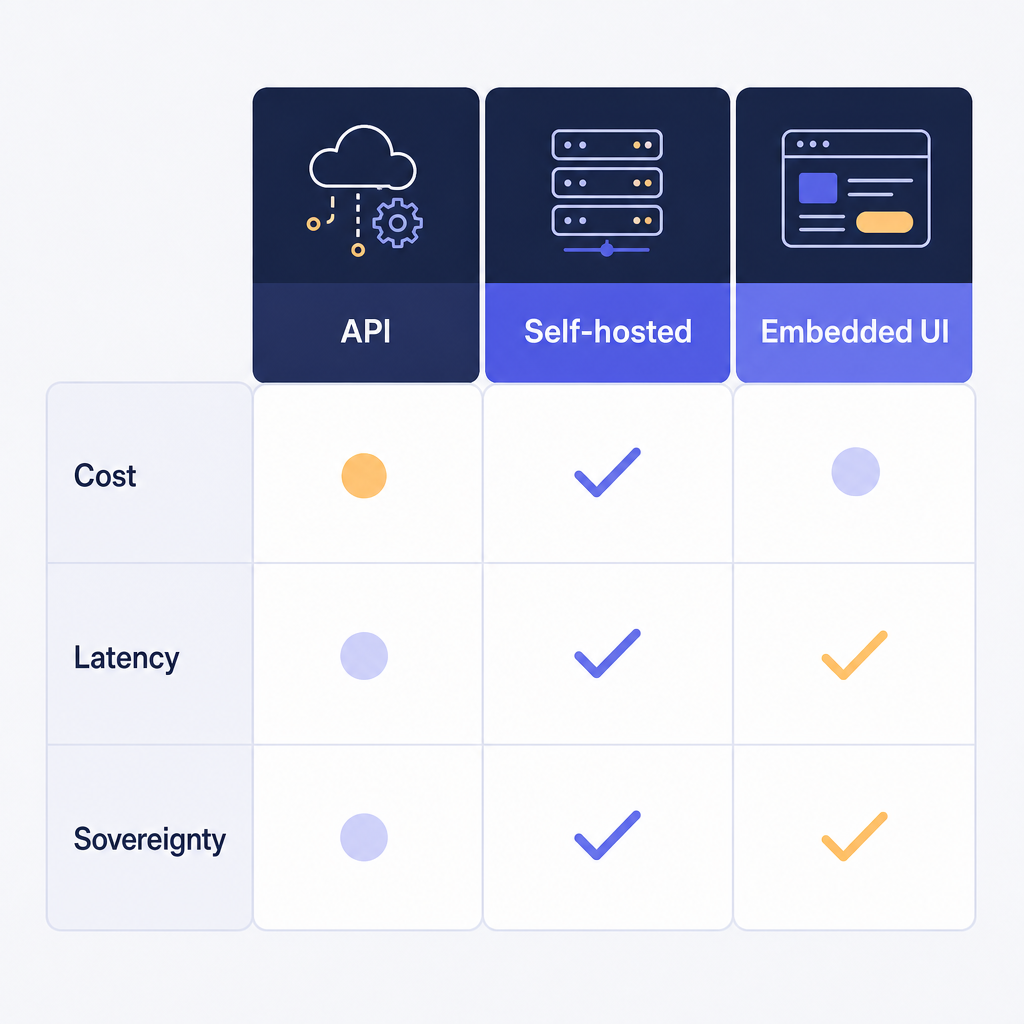
Cost is the compute to process video, so it scales with volume, and latency depends on local hardware and queue depth rather than a third-party round trip. Sovereignty stays high because the engine runs where the team deploys it and writes to the team's own buckets.
API availability depends on tier and deployment and is arranged through sales. The methods in automating redaction in high-volume environments and the integration walkthrough for security footage map onto this approach.
Pattern 2: Run a self-hosted redaction worker
Sovereignty-first teams reach for this pattern. The engine runs as a worker inside your network, processes files locally, and sends no media outside the boundary.
Key point: A self-hosted worker is the strongest answer to "our media cannot leave our environment" — the gate that opens most regulated deals.
The worker runs as a container, so it fits a virtual private cloud or an internal server room. A reverse proxy such as NGINX terminates TLS and routes traffic to it, while a Docker Compose file keeps the deployment reproducible.
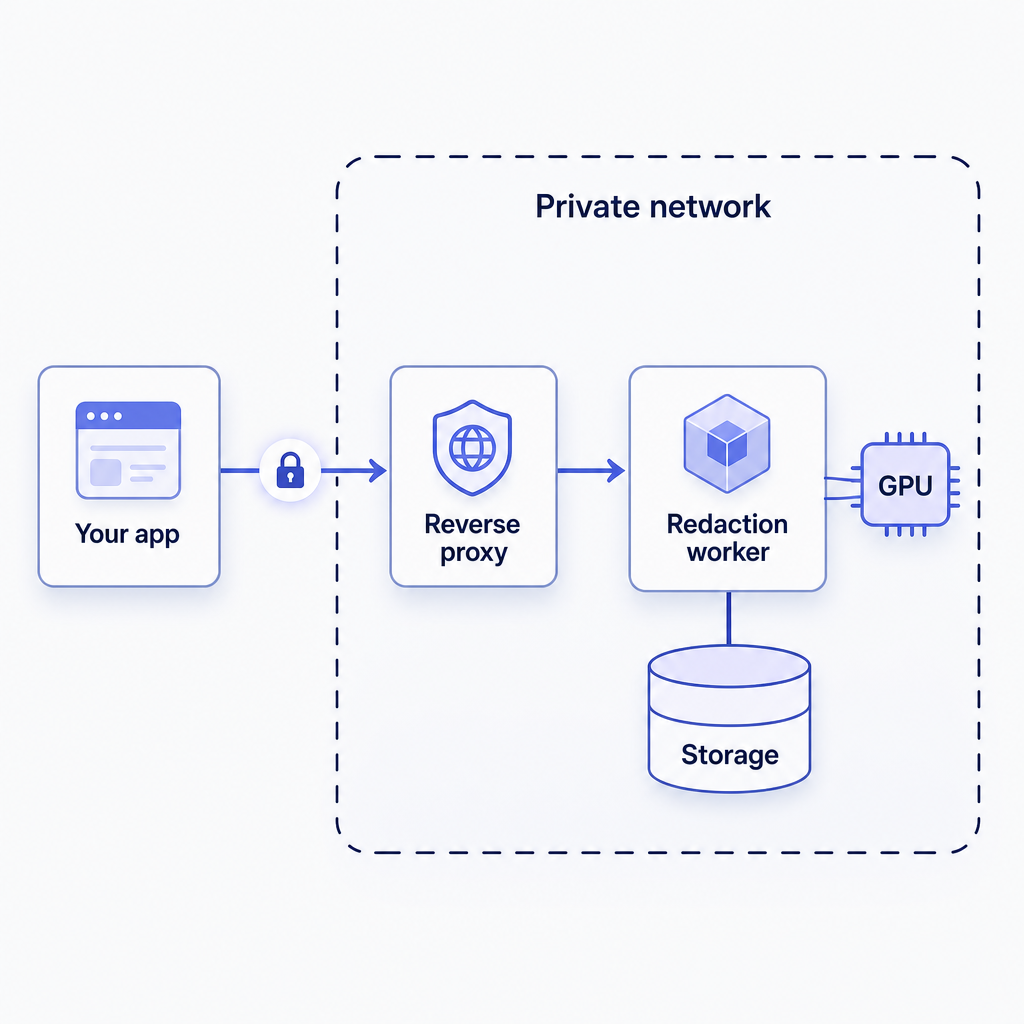
Detection is GPU-accelerated, so plan for an NVIDIA card with a supported CUDA compute capability and the NVIDIA Container Toolkit for container access.
Cost here is hardware and operations rather than per-file fees, latency is low because processing is local, and sovereignty is the highest of the three patterns. Teams debating where data should live can share on-premise versus cloud-based redaction with less technical stakeholders.
Pattern 3: Embed a white-labeled redaction editor
When users need to see and adjust redactions inside the product rather than hand work to a separate tool, the editor embeds so reviewers stay in one interface.
The editor mounts into an element on your page through a JavaScript library, following the embedded editor guide. Files load through the API under a project identifier, then the editor renders against that project.
A same-domain proxy keeps cookies first-party, while a cross-domain setup adds the required headers. Branding can be removed with CSS overrides, and editor events let your backend drive the final render instead of the built-in export. For enterprise tenants, single sign-on through SAML or OIDC aligns access with an existing identity provider.
The tradeoffs mirror the self-hosted worker because the editor talks to a server the team hosts: cost is the infrastructure, latency is interactive, and sovereignty stays high. Fully branded builds, where installers and documentation also carry a partner's identity, are arranged through a contract rather than self-serve.
Platforms that already manage review and disclosure — like the evidence management and e-discovery workflows partners build — tend to choose this pattern so reviewers never leave the case file.
How do you choose: cost, latency, or sovereignty?
Match the pattern to your dominant constraint and your review model rather than to a feature checklist.
- Fully automated pipeline (ingest, archive, bulk processing): call the REST API and skip the UI.
- Strict data residency (justice, health, insurance, classified): run a self-hosted worker.
- Human-in-the-loop product (review, approve, release): embed the editor so reviewers stay in your app.
- Mixed workload: combine them — the API pre-redacts on ingest, the embedded editor handles final review.
Note:
Detection reduces manual work, but a human review step before release is still the right default — especially where output must satisfy FOIA disclosure, a CJIS-regulated workflow, or HIPAA-covered footage.
All three patterns run against the same engine and keep media in infrastructure the team controls. Because redaction touches evidence, preserve originals and track outputs; the practices in metadata integrity for digital evidence apply regardless of pattern.
How Redactor helps you embed redaction
Sighthound Redactor is AI-powered video, image, and audio redaction software. It processes files rather than live streams, and it runs on Windows, Linux, and Docker, including offline and air-gapped deployments. A single engine backs all three patterns above.
Auto Detect covers seven object types in this UI order: Heads, People, License Plates, Vehicles, IDs, Screens, and Documents. It detects heads, not faces, and it does not identify individuals, which keeps the work focused on protecting information rather than recognizing people.
Smart Redaction handles automatic detection with trained computer-vision models, while Custom Redaction adds manual drawing tools. Render and Export styles include Mosaic, Pixelate, Blur, Outline, Fill, and Smart Fill.
Audio can be muted, beeped, or scrambled, transcription supports 8+ languages, and bulk workflows process hundreds or thousands of files at once.
Two constraints are worth planning for early. The server runs on Intel or AMD (x86_64) processors — Apple Silicon is not supported — and the newest NVIDIA Blackwell consumer cards are not yet accelerated and fall back to CPU. Build and CI hosts should match.
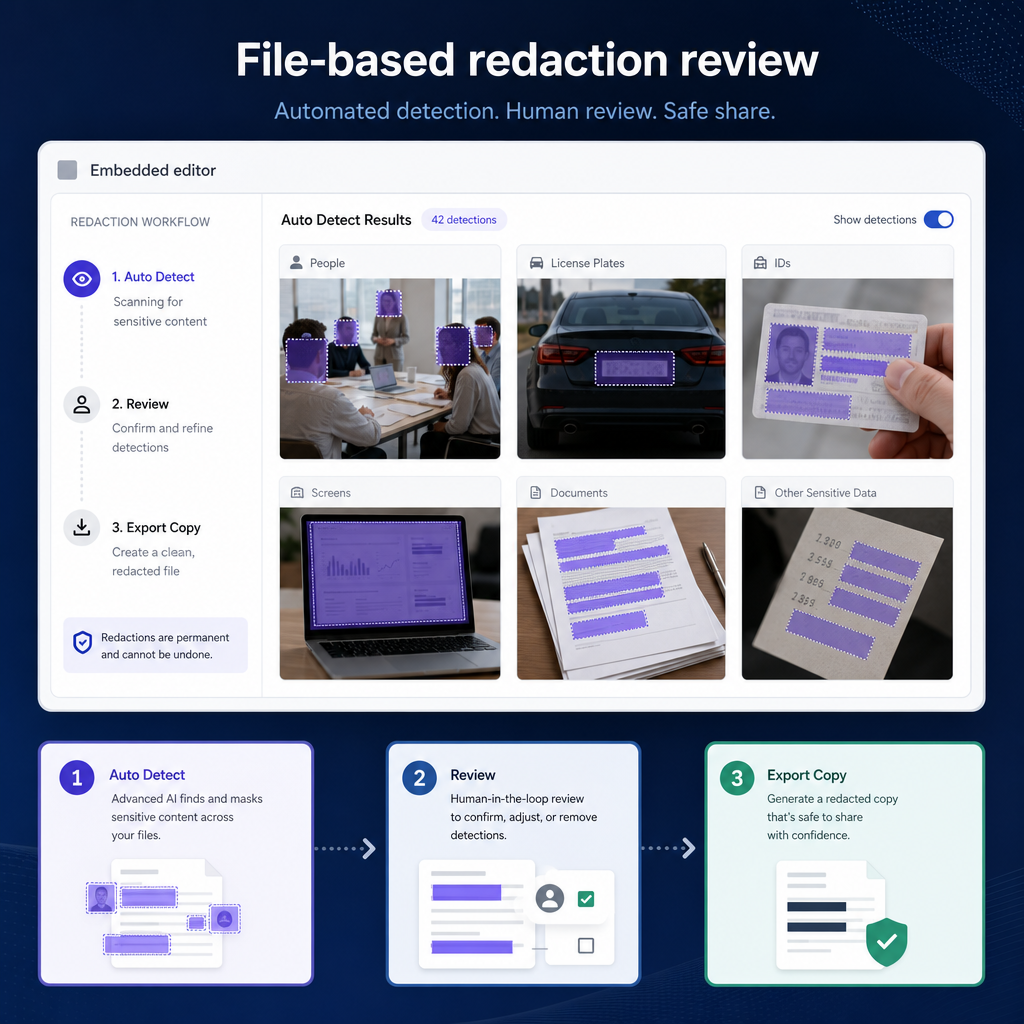
The fastest way to a working integration is the Redactor Agent Toolkit. It ships a Docker Compose configuration for a local server plus context files that an AI coding agent in Claude, Cursor, or GitHub Copilot can read, and a /get-started command that drives a first API call end to end.
The toolkit runs on x86_64 hardware. A 24-hour free trial covers the full product, and REST API access depends on tier and deployment, arranged through sales.
Key Takeaways
- Embedding a video redaction API for SaaS is an integration project, not a machine-learning project; the detection models already exist.
- Pick the pattern that matches the dominant constraint: API for automation, self-hosted worker for sovereignty, embedded editor for human review.
- All three patterns keep media in infrastructure the team controls and run against the same file-based engine.
- Keep a human review step before release, preserve originals, and track outputs so redaction holds up under disclosure rules.
FAQ
1. Does adding video redaction to a SaaS product require training a model?
No. Sighthound Redactor ships trained detection for heads, people, license plates, vehicles, IDs, screens, and documents, so teams integrate an existing engine instead of collecting data and building models. Engineering effort goes into the API call, the review workflow, and storage, not into model training or evaluation.
2. Which integration pattern suits a fully automated pipeline?
The REST API. A service posts a file, the detection features, and an output location, then reacts to a completion webhook. No editor is involved, which suits ingest, archival, and bulk jobs where humans review exceptions rather than every file.
3. Can redaction run without sending media to the cloud?
Yes. The engine runs fully offline and supports air-gapped deployment, with no internet access required for processing. A self-hosted worker keeps media inside the network, which is why regulated teams in justice, health, and insurance choose that pattern.
4. Does embedding redaction require Apple Silicon support?
No. The Redactor Server requires an Intel or AMD (x86_64) processor; Apple Silicon (M-series) is not supported. Plan server, build, and CI hosts around x86_64, whether the deployment uses Docker or Windows.
Legal Disclaimer
This post is informational and not legal advice. Redactor is tooling; compliance with FOIA, CJIS, HIPAA, GDPR, CCPA, and similar frameworks is the customer's responsibility. Consult qualified counsel for jurisdiction-specific requirements before relying on any disclosure, retention, or release workflow.
Sources
- Freedom of Information Act (DOJ)
- FBI CJIS Security Policy
- HHS HIPAA Privacy
- Redactor documentation
- Redactor developer portal
Related reading
- Redactor deployment models compared
- How to integrate the redaction API for security footage
- Evidence management and e-discovery workflows
- Automating redaction in high-volume environments
- Redactor Smart Redaction features
What to do next
Published on: